
Content and Locales
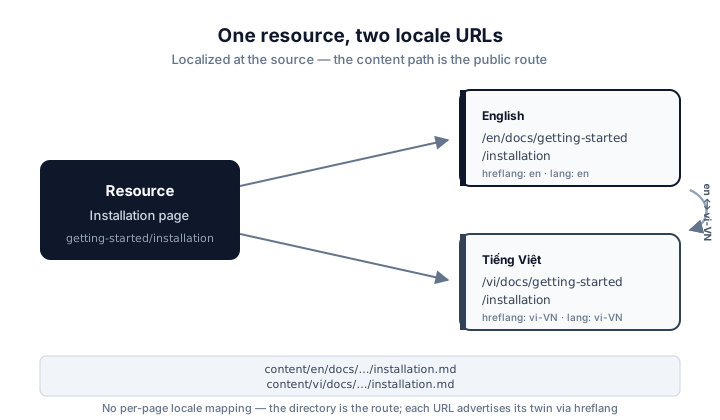
Documentation content is localized at the source: every page exists in each locale, and the content path maps directly to the public route.
Localized content
The docs content lives in apps/home/content:
content/
├── en/
│   └── docs/
│       └── getting-started/
│           └── installation.md
└── vi/
    └── docs/
        └── getting-started/
            └── installation.md
Each locale has its own copy of every page, written to read naturally in that language — not a machine translation of the other.
Content path → public route
The file path under content/<locale> becomes the public pathname exactly:
content/en/docs/getting-started/installation.md
                  ↓
/en/docs/getting-started/installation

content/vi/docs/getting-started/installation.md
                  ↓
/vi/docs/getting-started/installation
There is no per-page locale mapping — the directory is the route.
Self-contained URLs
Because the locale is part of the URL, every document has a self-contained canonical address. Links within the documentation stay inside the current locale:
/en/docs/concepts/public-web   ← English reader's link
/vi/docs/concepts/public-web   ← Vietnamese reader's link
Locale-aware navigation
The docs sidebar, breadcrumbs and previous/next navigation are derived from the content tree filtered to the current locale. An English reader sees only the English tree; the Vietnamese tree never leaks in, and prev/next never jumps across locales.
Telling search engines about the twin
Because a resource and its translations live at different URLs, each page
declares its twins with rel="alternate" hreflang links. The registry in
app/i18n defines the BCP-47 tags — en for English, vi-VN for
Vietnamese — and the docs app emits an alternate link for every locale that
actually has the same document. A page that exists only in English
advertises no Vietnamese alternate, so search engines are never pointed at a 404.
The same registry drives the language switcher in the header: switching locale
keeps the current resource and swaps only the first URL segment, so
/en/docs/getting-started/installation becomes
/vi/docs/getting-started/installation — never the docs home.
Previous: Public Web · Next: Guides